
Frequently Asked Questions
Q. When can I download the GOVA Pass App?
A. Good news! The new GOVA Pass mobile app is now available for download on the Apple App Store and Google Play Store.
Q. Is the GOVA Pass App compatible with all iOS and Android devices?
A. The app requires:
- iOS 13.0 or later
- Android 7.0 or later
Q. Which phone should I use to set up GOVA Pass?
A. Set up GOVA Pass on the phone you plan to use every day. Your wallet is linked to the device where you first created your account. If you switch phones later, we’ll need to help move your passes.
Q. Can I create a wallet for any fare type?
A. No. Your account defaults to Adult. If you need a reduced fare, visit the Downtown Transit Hub Kiosk to update your account before creating a wallet or buying passes. Using the wrong fare type may delay your ability to ride and will need to be corrected by the Technical Support team. For support with this issue, please contact govapass@greatersudbury.ca.
Q. What if I don’t have a mobile phone or internet access? Does my phone need to be connected to activate a ticket or pass?
A. You need an internet connection to buy fare products in the GOVA Pass app. Once they’re saved to your phone, you can use them even without an internet connection. The app does need access to cellular data or WiFi occasionally so it can update properly and keep your tickets available. If you don’t have a mobile device, regular access to an internet source, or prefer not to use the app, you can use the GOVA Pass Smart Card, launching later this spring.
Q. Why isn’t my QR code working when I try to scan it on the farebox?
A.Make sure you are scanning your phone over the correct QR code window on the farebox (the glass scanning area). The code must be held steady over this window for the farebox to read it properly.
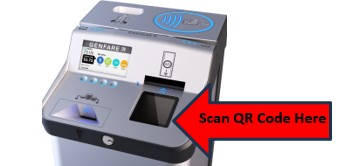
If you use Apple Wallet, holding your phone too close to the top of the farebox may trigger Apple Wallet to open automatically.
- This will pull you out of the GOVA Pass app
- You’ll need to reopen the app and retrieve your QR code again
Tip: Hold your phone directly over the scanning window, not near the tap-to-pay area at the top.
Q. Is the GOVA Pass App compatible with international phone numbers?
A. At this time, phone numbers from Europe, Asia, and other international regions are not compatible with the system.
If you attempt to download or use the app with an international number, you may see an error message such as:
“JSON could not be serialized because of error: The data couldn't be read because it isn't in the correct format.”
In the meantime, we recommend using our current magnetic ride cards, which are available at the Transit Kiosk, Public Libraries, and Citizen Service Centres (CSCs). These cards will continue to be sold until the launch of the GOVA Pass Smart Card this spring, which will provide another convenient option for riders who do not use the mobile app
Q. Do I need to get the GOVA Pass App?
A. No. During the transition period, existing magnetic bus passes and ride cards will continue to be accepted on GOVA Transit buses. However, as we work toward the change to GOVA Pass smart cards, the sale of magnetic cards will gradually be phased out. Once discontinued, riders will have the option to pay their fare using cash, a smart card, or the mobile app.
Q. Can I still pay cash?
A. Yes. Cash fares will continue to be accepted on all GOVA Transit buses. Riders can pay the standard cash fare by depositing exact change into the farebox when boarding.
GOVA Pass (mobile app or Smart Card) is simply an additional, more convenient option—not a replacement for cash.
Q. Is Debit or Credit Tap available on GOVA buses?
No. Debit and Credit Tap is not yet available on GOVA Transit buses. This feature is currently in development and is not a functional payment option at this time. If you prefer not to pay cash, please download the GOVA Pass Mobile App to purchase fares and load your account before boarding.
Q. When will the GOVA Pass Smart Card be available for purchase?
A. The reloadable GOVA Pass Smart Card will be available this spring, shortly after the launch of the GOVA Pass mobile app in March 2026. Magnetic ride cards will continue to be sold until that time.
Q. Can I still buy magnetic ride cards at third-party vendors?
A. Yes, but only while supplies last. During the transition to GOVA Pass, third-party vendors may continue selling any remaining magnetic ride cards they currently have in stock. Once their inventory is gone, no new magnetic ride cards will be supplied. Magnetics will continue to be sold at the Kiosk, Libraries and Citizen Services Centres until the Smart Card becomes available.
Q. How long will magnetic ride cards be accepted on fareboxes?
A. Magnetic ride cards will continue to be accepted on fareboxes during an extended transition period, ending on December 31, 2026.
Q. Is Transit Photo I.D. still required for concession fares?
A. Yes. Concession riders must still have a Transit Photo I.D. For app users, the Transit Photo I.D. is now provided digitally and can be viewed anytime in the Settings section of the GOVA Pass app. To obtain/renew a Concession account and obtain photo I.D., riders must visit the GOVA Transit Kiosk.
Q. Is there a cost for downloading the GOVA Pass App?
A. No the app can be downloaded free of charge from the App or Google Play Store.
Q. Are there any additional fees for using the App?
A. No, there is no extra cost or administrative fees for purchasing passes through the app.
Q. How do I buy fare using the GOVA Pass App?
A. Beginning March 2, 2026, you can buy fare directly through the GOVA App using Visa, Mastercard, or American Express. App payments apply only to mobile fare—Smart Cards cannot be reloaded through the app.
Q. How do I reload a GOVA PASS Smart Card?
A. Once available later this spring, Smart Cards can be reloaded through a separate online portal, or in person at any Citizen Service Centre or the GOVA Transit Kiosk. Smart Cards cannot be reloaded using the GOVA App.
Q. Is the App bilingual?
A. Yes. The GOVA Pass app is available in both French and English. To view the app in French, users simply need to set their phone’s language settings to French.
Q. Can I share my passes with friends or family?
A. Passes purchased through the GOVA Pass app are for individual use and cannot be shared. However, riders with an Adult, Concession, Senior, or Student 31-day pass may bring up to four youth (ages 12 and under) to ride free. QR codes are single-use and expire 5 minutes after activation. All transit passes remain the property of the City of Greater Sudbury. Misuse or fare evasion may result in confiscation or denied access under the Trespass to Property Act.
Q. How much time do I have for boarding once I have activated my ride?
A. Your QR code expires 5 minutes after activation, so wait until you are on board the bus before activating it. This ensures your code remains valid.
Q. What happens to my passes if I lose my phone?
A. When you lose your phone, or change it for a new one, you need to contact us via email and specify the email address associated with your account. When we receive your email, we will release your account from the old device, and you can re-install the application on your new device and login. All your previously purchased products and preferences will still be there. Please expect a 24 hours delay for this request.
Q. Can I buy more than one pass at a time?
A. Yes, you can purchase more than one pass at a time, but only one can be active at any given moment.
Q. Is the GOVA Pass App accessible?
A. Yes, the GOVA Pass app is compliant with WCAG 2.0 AA standards and is screen reader compliant and compatible with personal assistive technology.
Q. Need a transfer?
A. Just ask your bus operator after paying your fare. Transfers are valid for 90 minutes from the time of issue.
Q. Do my passes and ride cards expire in the app if I don’t use them within a certain amount of time?
A. 31 day passes expire 31 days after they have been activated. 6 Ride passes do not expire, rides are deducted from the cards.
Q. Can I use my GOVA Pass account on more than one device?
A. No, your GOVA Pass app and wallet can only be used on one device at a time. If you switch to a new device or lose your phone, please contact us to transfer your wallet from the old device.
Q. Will anything change for GOVA Zone passengers?
A. No. The process remains the same. After traveling to a GOVA Zone hub, passengers will continue to pay their fare when boarding the conventional GOVA Transit bus.
Q. Can I access a receipt for income tax purposes?
A. Yes. When you purchase a bus pass or ride card in the app you will be emailed a receipt for your purchase.